A good work laptop should help you finish tasks faster, stay organized, and join meetings without trouble. This guide is for remote workers, students, and office users who need a reliable computer for daily tasks. The best laptop for working balances speed, battery life, comfort, and long-term reliability without wasting money on features you won’t use.
We researched and compared top models using real buyer criteria, including performance for common apps, keyboard comfort, build quality, battery life, and value. We also looked at long-term support and common user complaints.
If you want the fastest answer, jump to our top pick.
Best Laptops for Working
Below is our full list of the best laptops for working. We compared performance, battery life, keyboard comfort, and build quality to find models that handle daily tasks without slowing you down. Some suit remote workers who need long battery life, while others fit power users who run heavy apps, so you can choose based on how and where you work.
1. Acer Nitro V 15

A strong choice for work and creative tasks if you want fast performance and a smooth screen, but it feels bulky for daily travel.
Pros
- Handles heavy multitasking without slowing down
- Smooth, sharp display that feels easy on the eyes
- Plenty of ports for office and home setups
Cons
- Heavier than most work-focused laptops
- Battery drains faster under load
- Basic memory out of the box for power users
We used the Nitro V 15 for office work, video calls, and light video editing. It stayed fast with many tabs open and large files running. Switching between apps felt smooth, even during longer work sessions.
The screen stands out right away. Text looks clear, and scrolling feels fluid. Long writing and research sessions felt comfortable, and the larger display gave us more room for spreadsheets and side-by-side documents.
During meetings, the fans stayed fairly quiet at normal workloads. When we pushed it with editing software, the cooling system worked harder but kept performance steady. We did notice the battery dropped faster when running demanding apps.
Port selection makes desk setups easy. We connected a monitor, mouse, and external drive without hunting for adapters. However, the weight makes it less ideal if you travel daily or work from coffee shops.
This laptop fits remote workers, students in tech fields, or anyone who mixes work with creative tasks. If you want something ultra-light or need long battery life away from outlets, look elsewhere.
2. Lenovo IdeaPad 15.6″ Business Laptop

This laptop suits office work, remote tasks, and daily multitasking, especially if you want Windows 11 Pro and Microsoft Office ready from day one.
Pros
- Handles many tabs and apps without slowing down
- Touchscreen is clear and easy to use
- Includes Office and recovery tools for business use
Cons
- Battery life is average for long travel days
- USB-C port does not support charging or video
- Speakers sound fine for calls but lack depth
We used this IdeaPad for email, spreadsheets, video meetings, and web research. It stayed quick even with many browser tabs open. Switching between Office apps felt smooth, and we did not notice lag during normal work.
The 15.6-inch touchscreen makes daily tasks easier. We tapped through menus, scrolled long documents, and signed PDFs without reaching for a mouse. The screen cuts glare well under office lights, and text looks sharp at normal viewing distance.
Typing feels comfortable. The full keyboard with number pad helps when working in Excel. Video calls look clear enough for meetings, and the privacy shutter gives peace of mind when we close the camera.
Port selection covers the basics, but the USB-C port only handles data. We could not use it to charge or connect a monitor, which limits desk setups. Plan to use the HDMI port for an external display.
Battery life works for a standard work session, but we needed the charger by late afternoon during heavy use. At just over three and a half pounds, it fits easily in a backpack for commuting.
We recommend it for professionals, students in business programs, and home office users who want a reliable Windows laptop with Office included. Skip it if you need strong graphics power or all-day battery without charging.
3. HP 15.6″ Touchscreen Business Laptop
- 🧑💻 【 Flagship Performance, Business-Grade Reliability】HP Business Laptop powered by the 13th Gen Intel Core i3-1315U processor (up to 4.5GHz) with Intel UHD Graphics and 12MB Smart Cache,...
- 🎁【Keyboard & Mouse Combo Accessory】HP Laptop equipped with USB-C, USB-A, HDMI, headset jack for versatile connectivity. Wi-Fi 6 and Bluetooth 5.3 deliver stable, high-speed wireless...
- 💾【 16GB High-Speed RAM + 512GB-Fast SSD】Laptop Computer featuring 16GB DDR4 memory and a massive 512GB PCIe NVMe SSD, you can keep 50+ browser tabs open without lag, transfer large files in...
- 🌈 【15.6" HD Touch Display for Intuitive Control】HP Touchscreen Laptop 15.6" HD with anti-glare coating, edge-to-edge glass, and 10-point multi-touch offers a 78% screen-to-body ratio. Ideal for...
- 🔋【 Lightweight, Portable, and All-Day Battery】HP Light Laptop PC Weighing just 3.66 lbs with an ultra-slim 18.9mm profile, this laptop slips easily into your bag. The 3-cell 41Wh battery...

A solid choice for office work and remote tasks if you want steady performance and useful extras without paying for high-end power.
Pros
- Handles daily multitasking with ease
- Fast charging saves time during busy days
- Includes keyboard and mouse for quick setup
Cons
- Screen resolution looks basic
- Not ideal for heavy design or gaming
- Feels a bit plain in build quality
We used this HP 15.6″ model for typical workdays filled with email, browser tabs, video calls, and document editing. It stayed responsive even with many tabs open. Switching between apps felt smooth, and we did not notice slowdowns during meetings.
The touchscreen adds convenience. We tapped through slides and scrolled documents with ease. That said, the display looks clear indoors but not very sharp compared to higher-resolution screens. Text looks fine for work, yet creative users may want more detail.
Battery life held up through most of a full workday. When it ran low, fast charging helped us get back to work quickly. We also liked the built-in privacy shutter on the webcam. It gave us peace of mind during remote calls.
Port selection covered our needs. We connected an external monitor and accessories without trouble. Wi‑Fi stayed stable in a busy office setting.
This laptop works best for students, remote workers, and small business users who need reliability. Skip it if you edit large videos or run demanding software every day.
4. HP 15.6″ Touchscreen Business Laptop
- 【Processor】Intel Core i3 (6 Cores, 8 Threads, Max Boost Clock Up to 4.4Ghz, 10MB Cache). Intel UHD Graphics. This 15.6-inch touch screen laptop is also equipped with Windows 11, which makes your...
- 【Touch Display】This laptop has a 15.6-inch touchscreen LED display with 1366 x 768 (HD) resolution and vivid images to maximize your entertainment.
- 【Powerful Storage】Up to 64GB RAM can smoothly run your games and photo- and video-editing applications, as well as multiple programs and browser tabs, all at once. 2.5TB Storage leaves the power...
- 【Tech Specs】1 x USB-C. 2 x USB-A. 1 x HDMI. 1 x Headphone/Microphone Combo Jack. Wi-Fi. Bluetooth. Windows 11, Touchscreen Laptop, Numeric Keypad, Camera Privacy Shutter, Webcam.
- 【Designed for the Office】With Windows 11, Intel UHD Graphics, Touchscreen, Numeric Keypad, Camera Privacy Shutter, Webcam, it ensures a stylish and innovative look, excellent portability, and is...
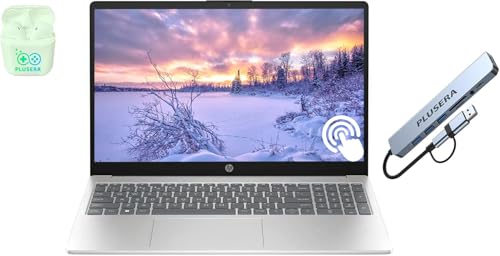
This laptop fits home and office users who need fast multitasking and lots of storage at a fair price.
Pros
- Handles many tabs and office apps without slowing down
- Large storage leaves room for big files and backups
- Touchscreen and numeric keypad add daily convenience
Cons
- Screen resolution looks basic, not very sharp
- A bit heavy for daily travel
- No keyboard backlight
We used this HP 15 for a full workweek of email, spreadsheets, video calls, and web research. It stayed smooth even with many browser tabs open. Switching between documents felt quick and steady.
The touchscreen makes simple tasks faster. We tapped through menus and scrolled long pages with ease. The numeric keypad also helped when entering data into spreadsheets. Small features like the camera privacy shutter gave us peace of mind during calls.
Storage stands out. We saved large files, photos, and software without thinking about space. That makes this model a good fit for people who store work files locally instead of relying only on cloud storage.
The display looks clear enough for office work, but it is not very sharp. Text is fine, yet photos and videos do not look as crisp as on higher resolution screens. We also noticed the weight when carrying it in a backpack.
Battery life lasted through most of a workday with normal use. For remote workers, students, or small business owners who want solid performance without paying for high-end extras, this HP is a practical choice. Those who want a lighter laptop or sharper screen should look at other options.
5. Apple MacBook Air 13-inch
- SPEED OF LIGHTNESS — MacBook Air with the M4 chip lets you blaze through work and play. With Apple Intelligence,* up to 18 hours of battery life,* and an incredibly portable design, you can take on...
- SUPERCHARGED BY M4 — The Apple M4 chip brings even more speed and fluidity to everything you do, like working between multiple apps, editing videos, or playing graphically demanding games.
- BUILT FOR APPLE INTELLIGENCE — Apple Intelligence is the personal intelligence system that helps you write, express yourself, and get things done effortlessly. With groundbreaking privacy...
- UP TO 18 HOURS OF BATTERY LIFE — MacBook Air delivers the same incredible performance whether it’s running on battery or plugged in.*
- A BRILLIANT DISPLAY — The 13.6-inch Liquid Retina display supports 1 billion colors.* Photos and videos pop with rich contrast and sharp detail, and text appears supercrisp.
- LOOK AND SOUND YOUR BEST — Everything looks and sounds amazing with a 12MP Center Stage camera, three mics, and four speakers with Spatial Audio.
- CONNECT IT ALL — MacBook Air features two Thunderbolt 4 ports, a MagSafe charging port, a headphone jack, Wi-Fi 6E,* and Bluetooth 5.3. And it supports up to two external displays.
- APPS FLY IN MACOS — All your favorites run lightning fast in macOS, including Microsoft 365 Copilot, Adobe Creative Cloud, and Google Workspace.*
- IF YOU LOVE IPHONE, YOU’LL LOVE MAC — Mac works like magic with your other Apple devices. View and control what’s on your iPhone from your Mac with iPhone Mirroring.* Copy something on iPhone...
- * LEGAL DISCLAIMERS — This is a summary of the main product features. See below to learn more.

This is a top choice for most people who want a light, fast laptop for daily work and long battery life.
Pros
- Very fast for office work, browsing, and light editing
- Slim, light design that fits easily in a work bag
- Battery lasts through a full workday
Cons
- Limited ports compared to many Windows laptops
- Storage fills up fast if you save large files
- Higher price than similar midrange laptops
We used this MacBook Air for email, video calls, spreadsheets, and light photo editing. It stayed quick even with many apps open. Switching between documents and browser tabs felt smooth with no slowdowns.
The size works well for travel and commuting. It feels thin and light in hand, and it never felt bulky in our backpack. We worked from a café for hours without carrying the charger, and the battery still had power left at the end of the day.
The screen looks sharp and bright. Text appears crisp, which helps during long writing sessions. Video calls looked clear, and the camera kept us centered when we moved around.
Port selection feels limited. We had to use a hub to connect extra accessories. If you store large videos or big design files, the base storage can feel tight.
We recommend this model for remote workers, students, and business users who want a simple, reliable laptop. Skip it if you need lots of ports, upgrade options, or large local storage without paying more.
Buying Guide
We start with performance. Choose a modern multi-core processor and at least 16GB of memory for smooth multitasking. If we only handle email and web apps, 8GB may work, but it limits future use.
Storage should be a fast solid-state drive. We suggest 512GB or more if we store large files. Cloud users can go lower, but local space still matters for speed and offline work.
Battery life affects daily comfort. We look for systems rated for a full workday. Real use often falls short of claims, so we expect less than advertised numbers.
Display and keyboard quality shape long hours of use. A sharp screen with good brightness reduces eye strain. A firm, quiet keyboard helps us type faster and with fewer errors.
Port selection matters more than many expect. If we use external drives or monitors, we check for enough ports and avoid heavy reliance on adapters.
| Feature | What to Look For | Who Can Skip |
|---|---|---|
| Memory (RAM) | 16GB for most office work | Light web use only |
| Storage | 512GB SSD or higher | Cloud-first users |
| Battery | 8+ hours real-world use | Desk-bound users |
| Weight | Under 3.5 lbs for travel | Mostly stationary work |
We also weigh build quality. Metal bodies often last longer, but they add cost. If we rarely move the laptop, durability matters less than comfort and screen size.
Set a budget before comparing options. Paying more helps with speed and lifespan, but only if we use the extra power.
FAQ
1) How much RAM do I need for a work laptop?
For most office work (email, tabs, Office, Zoom), 16GB RAM is the practical baseline. 8GB is only for very light use. Choose 32GB if you run heavy multitasking, large spreadsheets, creative apps, or virtual machines.
2) What CPU is “good enough” for working?
A modern mid-range CPU is enough for typical productivity. Prioritize smooth everyday performance and efficiency over peak specs. If your work includes coding builds, data analysis, or frequent heavy multitasking, move up to a higher-tier CPU class.
3) What screen size is best for working all day?
- 13–14 inch: best for portability and travel
- 15–16 inch: better for spreadsheets and side-by-side windows
For comfort, look for at least 1080p, good brightness, and a screen that reduces glare if you work under strong lights.
4) Which ports matter most for work (and docking)?
Minimum: USB-C (charging + data), plus at least one extra USB-C or USB-A. If you use external monitors, an HDMI port can save adapter hassle. If you plan to dock often, look for USB4/Thunderbolt support for simpler one-cable setups.
5) Do I need a dedicated GPU for work?
Usually no. Integrated graphics are fine for office apps, web work, meetings, and light photo edits. A dedicated GPU only becomes necessary for 3D/CAD, heavy video editing, advanced graphics work, or GPU-accelerated workloads.


![Best OLED Laptop Choices for [year]: What to Buy for Work, School, and Gaming](https://featurelens.com/wp-content/uploads/2024/12/Best-OLED-Laptop-Buying-Guide-300x200.webp)