
Home security is no longer about bulky equipment and long contracts with local technicians. Modern smart cameras let you monitor your property right from your phone, and consequently offer you peace of mind whether you are at work or away on vacation.
The Ring Spotlight Cam Plus stands out as a versatile option in this space. It has excellent video quality, lighting, and versatility in terms of power supply.
However, a security camera is only as good as its placement and setup. If you do not mount it correctly, you might end up with blind spots, a weak connection, or a battery that could drain pretty quickly.
We walk you through how to install Ring Spotlight Cam Plus without the stress. We cover everything from the initial configuration to the physical mounting process so your camera works perfectly on day one.
Key Takeaways
- Set up the camera in the app before mounting it outdoors.
- Ring recommends an installation height of 8 to 10 feet (2.5 to 3 meters).
- Secure all external wires with the included hardware to prevent weather damage or tampering.
- Test the camera feed, spotlights, and motion detection before finishing.
Tools & Hardware Included
Hardware Included
- Mounting screws
- Mounting anchors
- Security Screw for the metal collar
- Cable Clips for plug in and solar setups
Tools Required
- Phillips head screwdriver
- Drill with a 6 mm drill bit (optional)
How to Install Ring Spotlight Cam Plus

1. Charge the Battery Before Setup
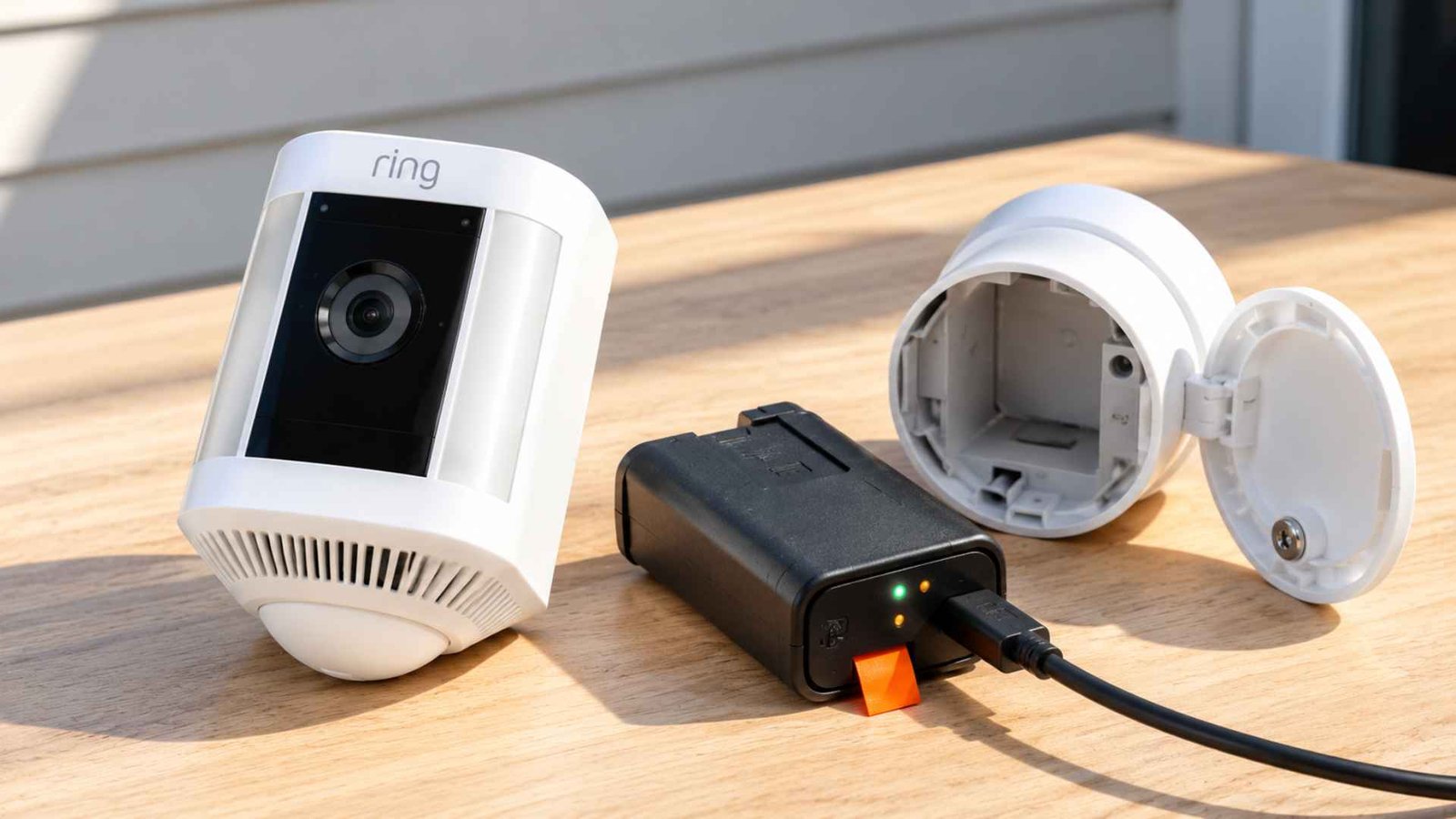
Start with the Spotlight Cam Plus battery. Twist the battery compartment counterclockwise to unlock it, then lift the cover away.
Slide out the Battery Pack and discard the orange insulator if your unit has one. Connect the charging cable to the pack’s charging port. While it charges, you will see two lights, a solid green and an amber one.
Keep charging until only the green light remains lit. Slide the pack back in until it clicks, set the cover back on, and twist it clockwise to lock it. Then tighten the Security Screw on the bottom of the battery compartment hatch to secure the casing. Peel off the protective film while you are here, because it blocks proper motion detection.
2. Complete Setup in the Ring App
Pair the camera before you install Ring Spotlight Cam Plus on the wall. Download and open the Ring App, tap Set Up a Device, and scan the QR Code on the camera or the one printed in the quick start guide.
Bring the camera close to your router for the Ring app setup, and if you own the plug in model, power it from an outlet near the router for now. Follow the prompts to join your network.
Once the app confirms a solid WiFi Connection, you can carry the camera outside. A weak reading at this stage is worth fixing now, since a Chime Pro or a closer router costs less than moving a mounted camera.
3. Choose the Right Mounting Location
Your camera mounting location decides how well motion detection works. Ring recommends about 8 to 10 feet off the ground, and that height applies to Ring Spotlight Cam Plus installations on walls and eaves alike.
Pick a spot with a clear view and no swaying branches or flags in front of the lens. Match the spot to your power source too. A Spotlight Cam Plus plug in model needs an outlet within reach of the cable, a hardwired unit needs a proper electrical source, and a Solar Panel needs direct sunlight with no roof edge or tree shadow.
Open Device Health in the app to check signal strength, and treat a RSSI reading between 0 and minus 60 as great for your Ring camera WiFi.
4. Set the Mounting Plate for a Wall or Eave
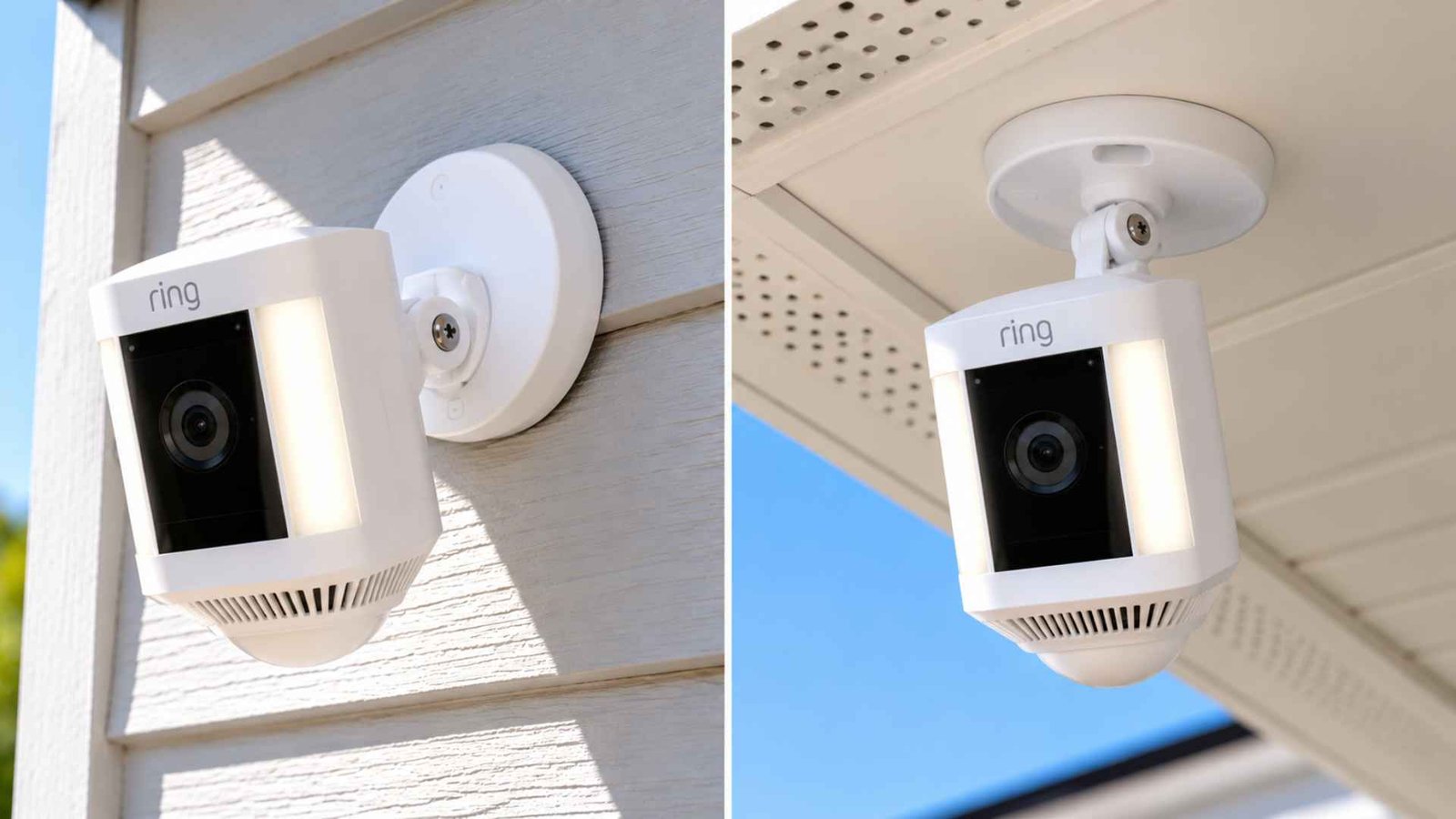
The Ring camera mounting plate can face two ways. The direction depends on where you install Ring Spotlight Cam Plus. For a wall, leave everything as shipped with the ball joint arm pointing straight down.
For an eave or overhang installation, press the release button on the mounting plate to slide it off, rotate the plate 180 degrees, and slide it back into the rear slot so the arm points vertically upward. On an eave, this orientation ensures the camera hangs correctly beneath the surface.
Choosing the direction now saves you from drilling a second set of holes later. Keep the rubber seal on the base so the camera stays securely fastened against the elements.
5. Remove the Mounting Plate From the Camera
The Ring Spotlight Cam Plus ships with the Mounting Plate pre-attached to the camera arm. You must take out this plate before you can fasten it to your home. Press the release button on the side of the mount to unlatch the mechanism.
Slide the plate off the arm with a firm tug. Set the camera body aside in a safe, dry place so it does not drop or scratch while you work with the screws. Handling the plate separately makes the actual wall attachment a lot less awkward.
6. Secure the Mounting Plate to the Wall
Hold the plate against your chosen surface and use a pencil to mark the screw holes. If you are mounting on wood or vinyl siding, you can drive the screws directly into the wall using your Phillips head screwdriver. For brick, concrete, or stucco, drill holes using a 6mm bit and push the plastic anchors into place first.
Align the plate with your marks and tighten the screws until the base sits flush. Secure installation prevents the camera from shaking during high winds, which can trigger false motion alarms or distort your recorded video.
7. Attach the Camera Mount and Secure the Battery Cover
Line up the camera mount arm with the installed wall plate and slide it straight down until it clicks and seats fully. Ensure the integrated safety fastener on the bottom battery compartment hatch remains completely tight.
This lid must stay fully shut to protect the internal battery contacts from weather elements, even if you plan to power the camera from an external cable and never use internal battery power alone. Give the mount a gentle tug afterward. If it shifts, take it off, check that the plate is flat, and start the step again.
8. Connect the External Power Source
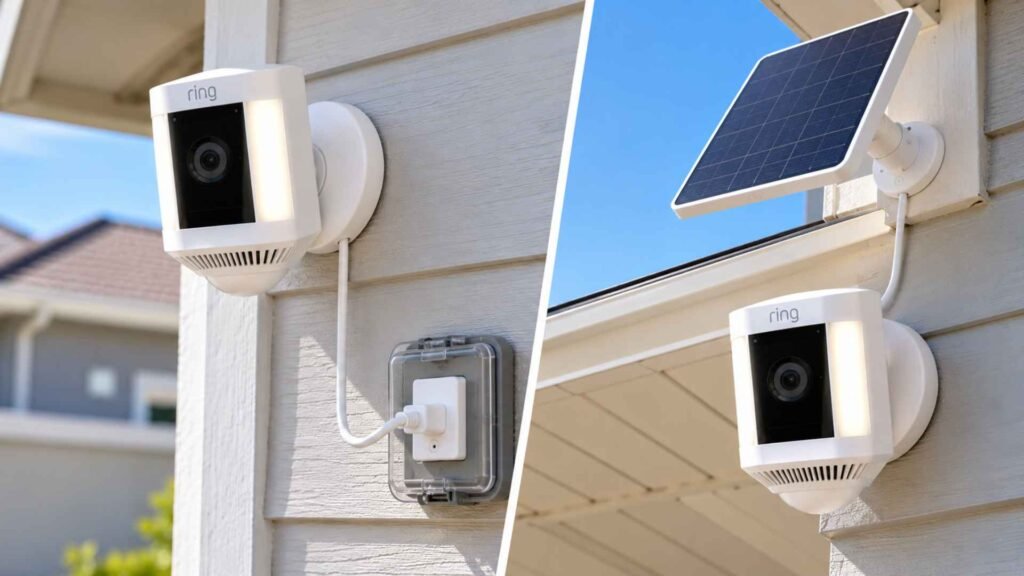
If you prefer continuous power, you can use the Spotlight Cam Plus plug in version or install an alternative energy source. For the plug-in setup, run the outdoor-rated power cable to the nearest electrical socket. If you bought a solar accessory, follow the standard Ring Solar Panel installation steps by mounting the panel in direct sunlight and running its wire to the back of the camera.
For a completely seamless look without visible outlets, you can use a Ring hardwiring kit to connect the unit directly to an electrical junction box. Choose the power method that best fits your home architecture.
9. Secure the Cable and Adapter
Run the cable along the wall and keep it out of foot traffic. Press each included clip over the cable and fasten it to the wall with its screws. On stucco or brick, drill a 6 mm hole first and tap in an anchor before you fasten the clip.
If you use the plug-in adapter, mount its protective housing to the wall using the installation fasteners from the box. Neat cabling matters for Ring Spotlight Cam Plus installations, since a dangling cord can get snagged and pull on the port. Leave a small downward loop of cable near the plug so rainwater drips off before it reaches the connection.
10. Attach the Camera and Adjust the View
The high-friction ball joint socket allows you to reposition the camera smoothly without loosening a separate bracket ring. Firmly grip the camera body and push the joint directly into the plate socket until it snaps firmly into place.
Open Live View in the app and check what the camera sees. Rotate the camera until the doorway, driveway, or yard fills the frame, and tilt it slightly down so you cover the ground and not the sky.
Take your time here, since a small angle error can miss the spot you care about. Now access your Ring motion detection settings to draw your customized Motion Zones around the areas that matter, leaving out busy streets or neighboring yards. Walk through the area at night to confirm the internal lights and sensors respond properly.
Common Installation Problems and How to Fix Them
Even with careful planning, you might run into a few technical snags. Here is a quick guide to Ring camera troubleshooting for the most common issues homeowners face during setup.
- The Camera Will Not Connect to WiFi: Check the Ring camera WiFi signal in Device Health, and move the router closer if the reading is weak. Confirm you picked the right network and typed the password correctly.
- The Camera Feels Loose: Take the camera mount off the plate and look for a gap. Tighten any screw that spins freely, add anchors on masonry, and recheck the screw on the metal collar.
- Motion Detection Misses Visitors: Open the Ring motion detection settings, raise the Motion Sensitivity slider, and check that your zones cover the walkway. Raising Motion Frequency helps too, though it shortens battery life. Peel off any leftover protective film.
- The Power Cable Will Not Reach: Never stretch the cable. Pick a closer outlet or move the mount nearer to the power source. Battery or solar power also removes the cable run entirely.
Frequently Asked Questions (FAQs)
How high should I mount Ring Spotlight Cam Plus?
Mount it about 8 to 10 feet off the ground. Ring recommends that height for the best motion detection, and going much higher or lower can cause inconsistent alerts and a reduced field of view.
Can I install Ring Spotlight Cam Plus myself?
You can install Ring Spotlight Cam Plus pretty much by yourself. The package includes almost all the hardware you need, and you only need a basic screwdriver and an optional drill to finish the job.
Can Ring Spotlight Cam Plus be plugged in?
You can purchase a dedicated outdoor power adapter to plug the unit into a standard wall outlet, or you can rely entirely on the rechargeable battery pack.
Wrapping Up…
Ring Spotlight Cam Plus installation is straightforward if you complete the app setup first and choose the correct mounting position. Charge the battery where required, orient the plate correctly for a wall or eave, secure the hardware, and connect only the power accessory intended for your model. Once you install Ring Spotlight Cam Plus, take a few minutes to test the live feed, spotlights, and motion alerts.