
When you hear the name Philips, you probably think of light bulbs, electric toothbrushes, or kitchen appliances. That makes total sense since this Dutch company has been building household tech for over 130 years, and they bring that exact same engineering weight to front door security.
Honestly, we really came to admire the Philips 4200 Series smart lock after digging through thousands of verified buyer reviews, where it consistently holds ratings above 4 out of 5 stars, and testing its security and daily convenience ourselves. You can think of it as a practical step up from the older Philips 4000 series.
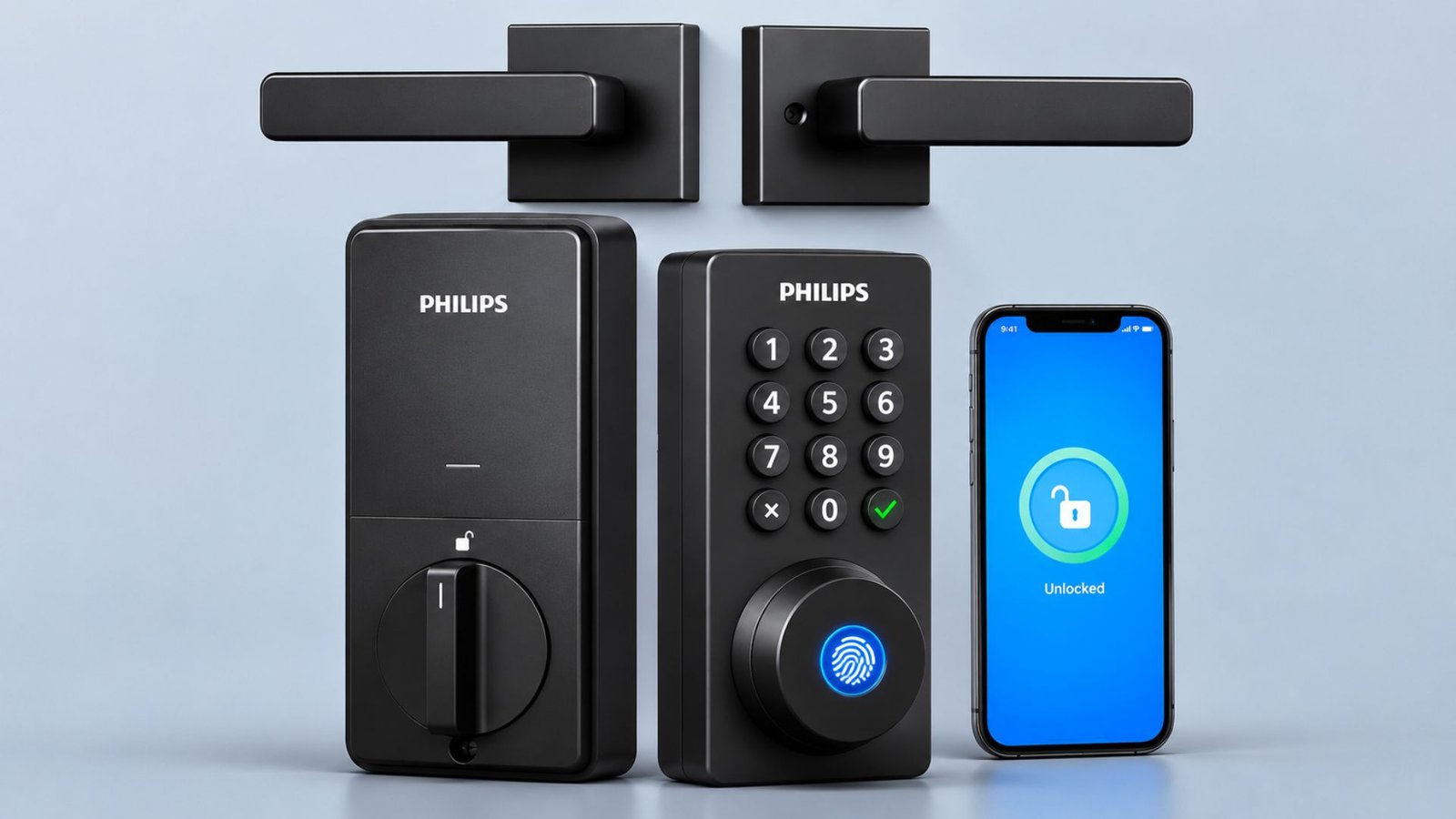
You get quick fingerprint entry, a backlit push button keypad, built in WiFi, remote phone control, and a matching door lever right in the box to make your busy routine a whole lot easier. In this Philips 4200 Series smart lock review, we walk you through its speed, app setup, battery life, and build quality so you can figure out if it belongs on your front door.
| Specification | Detail |
|---|---|
| User PIN Codes | Up to 100 |
| Recommended WiFi Range | Up to 33 ft (10 m) |
| Battery Type | 8 AA Alkaline Batteries |
| Dimensions | 6 x 2.2 x 1.5 inches |
| Weight | 5.15 lbs |
| Fingerprint Recognition | 0.3 seconds |
| Fingerprint Capacity | Up to 20 fingerprints |
| Material | Aluminum Alloy / Metal |
Design and Features
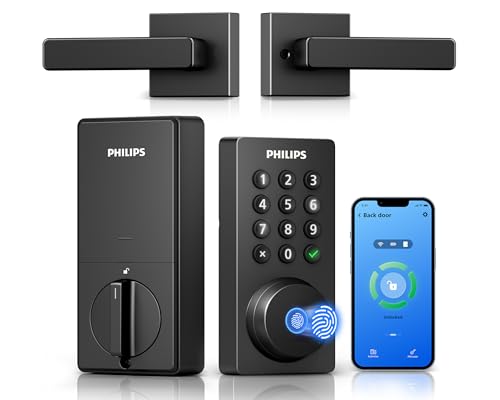
The first thing you’ll notice about this Philips WiFi smart lock is its combination of a traditional keypad design and modern access features. You get a beautiful matte finish that stays fingerprint resistant, paired with raised physical buttons.
Those buttons are large, backlit, and easy to see at night. We really love that feature cause it’s especially useful for kids or grandparents who would prefer a code over a phone app. You can store up to 100 user PIN Codes, and they come as permanent, temporary, recurring, or one time.
Right above the keypad sits a responsive biometric reader that delivers Fingerprint access in just 0.3 seconds from touch to open. It’s pretty much the fastest way to open the front door especially when you are in a hurry or come back after shopping and don’t want to dig deep in your jacket to search for the keys.
The coolest thing we think is the number of fingerprints you can save. It’s 20!!! So probably all of your family members, including kids, are gonna fit into that way easily. Unlike 4000 series smart locks, this version does support built-in wifi and it therefore eradicates the need for annoying external hubs or bridges.
You connect straight to your 2.4GHz router and gain immediate remote control through the Philips home access app. Even when you are upstairs in bed or out of the country, you can double check that the door is locked or tap unlock for a visitor (All remotely!).
The app also sends real time notifications and keeps a complete access history showing when the door opened, what code was used, or whose fingerprint unlocked it.
Instead of passing out dozens of physical brass keys and worrying about who lost what, you manage everything seamlessly from your phone. You can easily assign custom PIN Codes for family members, babysitters, or temporary guests, and register fingerprints for everyone who goes in and out periodically.
If someone stands behind you on the porch, the anti peeping feature lets you type random decoy numbers before and after your real code. Hands full of groceries? Just say, “Alexa, lock the door,” or, “Hey Google, is the front door locked?” That seamless Voice Control fits right into your smart home setup alongside your cameras.
You can also set the auto lock timer between 10 and 180 seconds, though you must watch out when the door automatically shuts so you do not lock yourself out without a registered print or backup key. For traditionalists, Philips still includes two mechanical keys in the box, though.
Another Good Read: Anona Dual Cam Video Doorbell Review
Installation and Performance: Smooth Setup and Reliable Daily Access
If you happen to have a regular run of the mill deadbolt and bottom locking knob, swapping this unit in would feel very plug and play. In many standard setups, you do not even have to take out half the existing door hardware if the latch dimensions already match.
When you do a full fresh swap, the job stays simple enough to finish in twenty minutes with a standard Phillips screwdriver (which obviously comes with the unit). Start things off by installing the deadbolt latch assembly and sliding the exterior escutcheon with its data cable through the door opening.
Next, attach the mounting plate to the exterior component and connect the data cable to the interior escutcheon before securing it to the plate. Once the hardware is in place, you can safely insert the eight AA batteries and hold the reset button for five seconds to calibrate the bolt direction.
Finally, download the Philips home access app and create an account to pair the lock and control it from your phone (both Android & iPhone work perfectly fine).
One thing you really should care about is checking your door before you order. It needs a thickness between 1 3/8 and 2 inches, a cross bore of 1 1/2 or 2 1/8 inches, and a backset of 2 3/8 or 2 3/4 inches. Though once you install the philips door lock, it does perfectly what it is supposed to do.
What We Like about Philips Smart Lock
There are several reasons this Philips fingerprint door lock deserves consideration. First, having multiple unlocking options means you aren’t dependent on a single method. You can use your fingerprint, keypad, app, or traditional key depending on what is convenient.
Second, the included handle is a genuine advantage. If you’re replacing an existing deadbolt and door lever, having matching hardware in one package can save you the trouble of purchasing separate components.
We also like the flexibility of temporary access codes. Instead of passing physical keys to everyone who needs to enter your home, you can create a code for a housekeeper, contractor, or visitor and revoke it later.
The app adds another useful layer of convenience. You can check whether the door is locked while upstairs in bed or away from home, and the activity log gives you a record of lock events.
Our Research Process
For an in-depth philips 4200 series smart door lock assessment, we cross checked manufacturer engineering manuals, retail specification sheets, and verified buyer reports. We looked at all the key features to consider when choosing a front door lock, such as fingerprint, connectivity, access control, installation, and battery.
The product has received some good and bad reviews from customers. Many owners are
happy with the fingerprint scanner, ease of adding/removing codes and great customer service. However, some have experienced issues with connecting to the app (especially iPhone users) occasionally, and some have mentioned the product feels cheap with some plastic parts.
We have separated the product specs from customer experiences and have not considered individual testimonials as an independent test of the product’s performance. Our aim is to see if the product provides good value for a standard household. And honestly, it holds up well for everyday family use as long as your WiFi router sits close enough to the front door.
Pros
- Fingerprint and PIN entry
- Built in WiFi
- Remote access through the app
- Temporary and recurring PIN codes
- Alexa and Google Assistant support
Cons
- Supports 2.4GHz WiFi only
- App setup may require troubleshooting
Philips 4000 Series Smart Lock vs 4200 Series
We’ve also compared Philips 4200 series wifi smart lock with its traditional 4000 series model to figure out what changes have been made and whether they are worth it or not.
- Touchscreen and Physical Buttons: The 4000 series has a slim, flat touchscreen glass panel that lights up when touched. The 4200 series has button pads, which many people prefer as they have a tactile feel so you can use them in the dark or with gloves on.
- WiFi Connectivity Variations: Every 4200 series smart lock includes built-in Wi-Fi out of the box. Within the 4000 Series, standard Bluetooth models (such as the DDL240 and DDL240X-15HB variants) require a separate Wi-Fi bridge for remote control, whereas updated Wi-Fi variants (DDL240X-1HW, DDL240X-15HW, and DDLOM1040X-1HW) feature built-in Wi-Fi with no bridge needed.
- User Capacity. The 4000 series door lock stores up to 50 unique fingerprints. It makes it better suited for large households, offices, or short term rentals. Base 4200 Series units cap fingerprint storage at 20 users.
Is the Philips 4200 Smart Lock Worth Buying?
Depending on the model you choose, the Philips 4200 smart lock gives you fingerprint, PIN, app, key, and voice entry at a reasonable price, and it skips the hub that adds cost to many rivals. Buying the bundled kit with a matching lever also saves you a trip for extra hardware. Before you order, confirm three things.
Your door must match the thickness, cross bore, and backset ranges. Your router must offer a 2.4GHz band. You also need to budget for eight AA batteries, because they aren’t included. The lack of emergency backup power means you should keep a physical key in a safe spot. If those points fit your home, this lock beats a basic keypad deadbolt on convenience and access records.
Frequently Asked Questions (FAQs)
Does the Philips 4200 Smart Lock Require a WiFi Hub?
No. WiFi is built into the lock, so remote lock, unlock, and notifications work directly through the Philips Home Access app. It connects to 2.4GHz networks only.
How secure is Philips 4200 series smart lock?
It includes an anti drill design, an anti peeping password, a wrong entry alarm, an away mode alarm, and a jam alarm. Fingerprint and PIN entry add control over who gets in. We couldn’t confirm a certified grade for this model, and your WiFi security matters too, so use a strong router password.
How Long Does the Philips 4200 Battery Last?
Philips advertises up to six months of Battery Life on eight AA alkaline batteries, which you buy separately. Heavy use could however shorten that figure. The app sends a low battery alert before the cells run out.
Is Philips 4200 series door lock better than 4000 series?
It depends on your priorities. The 4200 Series features a physical push button keypad and includes built in WiFi across its lineup. The 4000 Series uses a sleek touchscreen keypad and supports up to 50 fingerprints, compared to 20 fingerprints on most 4200 models. While older 4000 Series locks rely on Bluetooth and need a separate WiFi bridge, current 4000 Series models also come with built in WiFi.
What happens if the batteries die while I am locked out?
The lock warns you well before the batteries fail. If they do die, use the physical key that comes in the box. The listing says emergency power isn’t supported, so keep a spare key somewhere reachable and spare batteries on hand.
Wrapping Up…
The Philips 4200 smart lock earns its place if you want fingerprint and keypad entry, remote access, and no hub. The WiFi is built in, the app records every entry, and the matching handle completes the door. Plan for eight AA batteries, a 2.4GHz network, and a quick check of your door measurements. If you have a large household that needs more than 20 fingerprints, look at the 4000 Series. For most homes, this smart door lock answers the question we started with. It offers enough everyday convenience and useful security to justify choosing it over a basic keypad deadbolt.