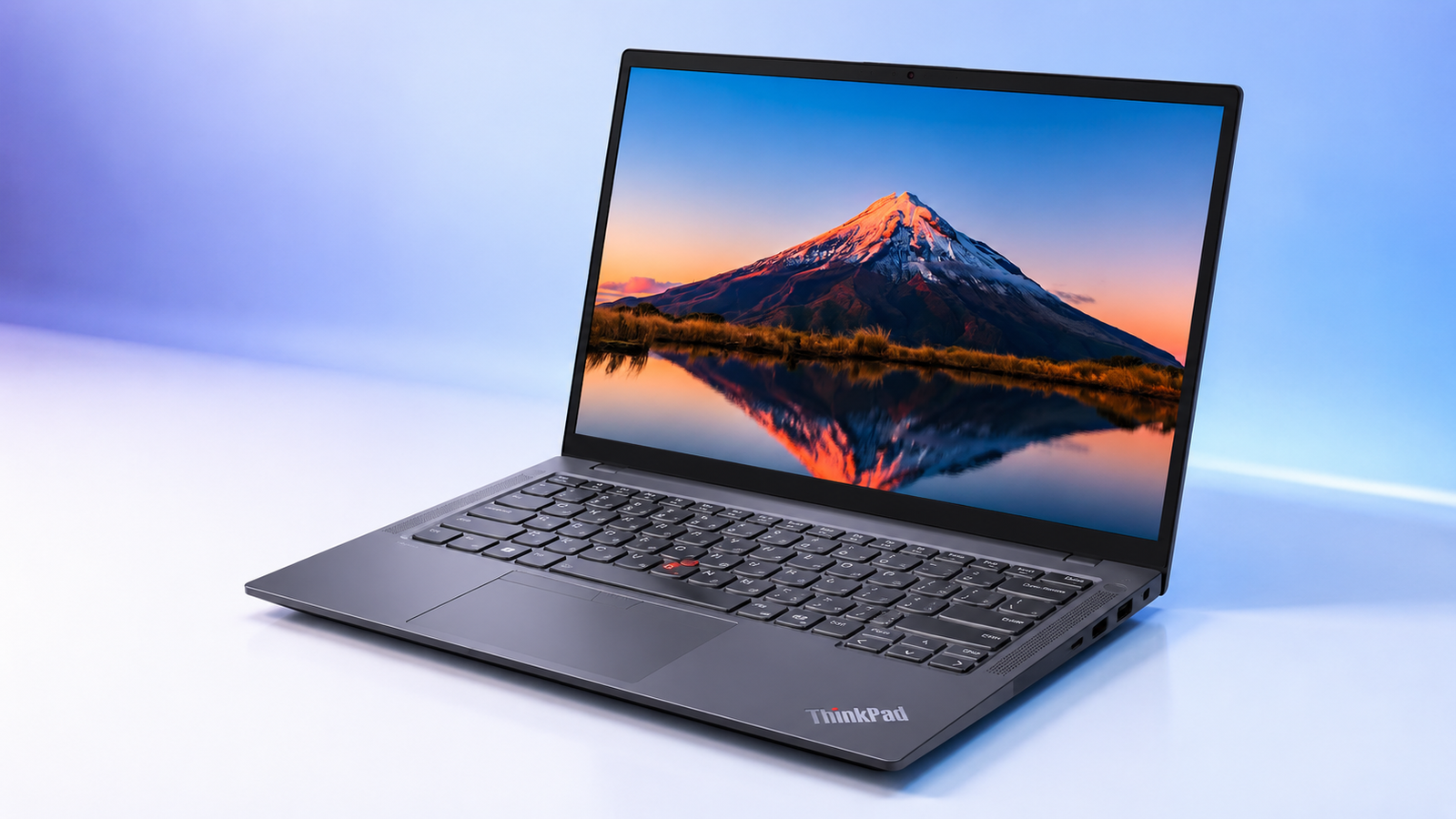
Business laptops rarely generate excitement, and that is kind of the point. Reliability, security, and steady performance shouldn’t be ignored. That is exactly the space the Lenovo ThinkPad T14 has occupied for years, and the latest version keeps that reputation intact.
This Lenovo ThinkPad T14 review looks at what changed under the hood, what stayed the same, and whether the price actually matches what you get. Based on research pulled from spec sheets, independent lab tests, and real user feedback, this ThinkPad T14 business laptop earns its spot on a lot of corporate approved lists, and it is worth knowing exactly why before you commit a company budget or your own money to one.
Lenovo ThinkPad T14 at a Glance
Here is the configuration we focused on for this Lenovo ThinkPad T14 review, the same setup most business buyers land on.
- Processor: Intel Core Ultra 7 155U
- Display: 14 inch WUXGA (1920×1200) IPS Anti Glare, 400 Nits
- Memory: 16GB DDR5 RAM
- Storage: 512GB PCIe SSD
- Graphics: Intel Integrated Graphics
- Operating System: Windows 11 Pro
- Connectivity: WiFi 6E, Bluetooth, Thunderbolt 4
- Security: ThinkShield, Fingerprint Reader, Webcam Privacy Shutter
This ThinkPad T14 business laptop configuration balances price and performance well for most corporate buyers.

Key Features of the Lenovo ThinkPad T14
The ThinkPad T14 business laptop earns its reputation through a handful of features that matter far more in daily use than spec sheet bragging rights.
Intel Core Ultra 7 155U with AI Performance
The Core Ultra 7 155U sits at the center of this machine, built on Intel’s Meteor Lake platform with a mix of performance and efficiency cores plus a dedicated NPU for AI acceleration.
Intel Ultra chips like this one represent a real step up from the previous generation’s standard U series processors, and Lenovo markets this configuration as part of its lineup of AI PC options, thanks to that same NPU handling supported AI workloads locally instead of leaning on the cloud.
That NPU handles background tasks, Windows Copilot features or video call enhancements, without dragging down the CPU or GPU while you work.
Independent Geekbench 6 testing puts this chip in the 9,500 range for overall score, respectable for an ultrabook class processor rather than a flagship. Intel vPro support on select configurations adds remote management that IT departments actually rely on, letting them patch and monitor machines without physically touching them.
Marketed partly as an AI business laptop, the T14 leans on this hardware to keep Copilot running smoothly. For anyone comparing an Intel Core Ultra 7 laptop against older options, the efficiency gain alone justifies the upgrade.
14 Inch WUXGA IPS Display
The 14 inch panel runs at 1920 by 1200 resolution, a taller aspect ratio than the old 16 by 9 standard that gives noticeably more vertical space for spreadsheets and long documents.
Brightness tops out around 400 nits, plenty for most office lighting, and the anti glare coating cuts down on reflections near windows. This IPS display holds color and viewing angles well for a business machine, and eye strain stays minimal even after a full workday.
Fast DDR5 Memory and SSD Storage
Sixteen gigabytes of DDR5 RAM running at 5600 megahertz handles typical business workloads without much complaint. The 512GB PCIe SSD boots the system in seconds and loads applications noticeably faster than the SATA drives still found in some competing laptops.
For ThinkPad T14 performance in everyday scenarios, opening large PDFs or switching between apps, this combination keeps things moving without the lag common on business machines a few years back.
Enterprise Level Security
Lenovo’s ThinkShield framework wraps hardware, firmware, and software protections into one system, which matters a lot for an enterprise laptop handling sensitive client data. A match on chip fingerprint reader stores biometric data directly on the sensor rather than passing it through the main system, closing off a common attack vector.
The physical webcam privacy shutter solves a real problem, no more sticky notes covering the camera. Combined with TPM 2.0 protections, this laptop for professionals handling confidential work checks every box a corporate security team typically demands.
Connectivity and Expansion
Two Thunderbolt 4 ports support external monitors, fast storage, and docking stations without needing a dozen adapters. This Thunderbolt 4 laptop setup also includes USB-A ports for older peripherals, a full size HDMI 2.1 port capable of driving a 4K display, and WiFi 6E for faster, less congested wireless in busy office environments.
An included 7 in 1 USB C hub rounds things out for anyone traveling between conference rooms. As a WiFi 6E laptop option, it holds a stable connection even in crowded coworking spaces.
Built for Hybrid Work
A 5 megapixel webcam is a genuine upgrade over the grainy 720p cameras still common on business laptops. The backlit keyboard makes early morning sessions easier on the eyes, and Lenovo’s keyboard feel remains one of the better ones in the category, deep travel, minimal flex, satisfying feedback.
Since this ships as a Windows 11 Pro laptop out of the box, IT teams skip the extra step of upgrading a whole fleet from Home edition, which keeps productivity steady from day one. At just over seventeen millimeters thin and under three pounds, it travels well.
How We Choose Lenovo ThinkPad T14, Our Research
We, entirely based on research pulled from official Lenovo spec sheets, independent lab benchmarks, and real user feedback across forums like Reddit and Quora, put together this breakdown of what actually matters in daily use for the Lenovo ThinkPad T14.
Rather than relying on marketing copy, we cross checked processor benchmarks, battery results, and repeated complaints or praise from verified buyers. This business laptop review approach means the pros and cons below reflect real world performance, not a features list copied from a press release.
Based on everything above, here is where the Lenovo ThinkPad T14 stands out and where this ThinkPad T14 business laptop falls short.
What We Like
- Excellent keyboard and build quality
- Solid security features
- Thunderbolt 4 and WiFi 6E
- High quality 5MP webcam
- Quiet cooling system
- Windows 11 Pro included
What We Don’t Like
- Integrated graphics limit gaming performance
Who Should Buy the Lenovo ThinkPad T14?
This Lenovo ThinkPad T14 fits business professionals who spend most of the day in spreadsheets, email, and video calls. Remote workers and frequent travelers benefit from the light weight and solid battery life, while students get a durable machine built for daily use.
Corporate users and IT managed organizations appreciate the security stack. Content creators with light workloads, basic editing or writing, will find plenty of power here too.
Frequently Asked Questions (FAQs)
Can the ThinkPad T14 handle video editing?
Light editing works fine, trimming clips or exporting short projects will not overwhelm this machine. Heavier 4K timelines with multiple effects layers will slow things down fast, since integrated graphics ain’t built for that kind of sustained load.
Is Intel Core Ultra 7 better than Core i7?
In most everyday tasks, yes, largely thanks to the added NPU handling AI workloads separately from the CPU. Raw multi core performance is similar to recent i7 chips, but efficiency and battery life see a real improvement.
Does the ThinkPad T14 support Thunderbolt 4?
It includes two Thunderbolt 4 ports, both capable of driving external displays and fast storage at full bandwidth.
Wrapping Up…
The Lenovo ThinkPad T14 earns its price tag through steady performance, real security features, and a keyboard that still leads the category. As a Lenovo business laptop, it goes head to head with the Dell Latitude and HP EliteBook lines, and holds its own comfortably. It will not satisfy gamers or video editors chasing raw graphics power, but that was never the point. For business professionals and IT departments managing a fleet of machines, this ThinkPad T14 business laptop delivers exactly what it promises.